Infrastructure
The infrastructure layer provisions the AKS foundation: cluster, node placement, networking, and baseline resource conventions. Privileged Azure authorization is split into a separate state (infra-access/) so contributors can operate infrastructure without elevated permissions (see ADR-0020).
AKS Automatic
AKS Automatic provides a managed Kubernetes experience with built-in best practices (see ADR-0002):
- Simplified operations: Auto-scaling, auto-upgrade, auto-repair
- Built-in best practices: Network policy, pod security, cost optimization
- Integrated Istio: Managed service mesh without manual installation
- Deployment Safeguards: Gatekeeper policies for compliance
These capabilities reduce the platform-assembly burden and give contributors a reproducible, secure baseline without manual cluster configuration.
Zone Topology
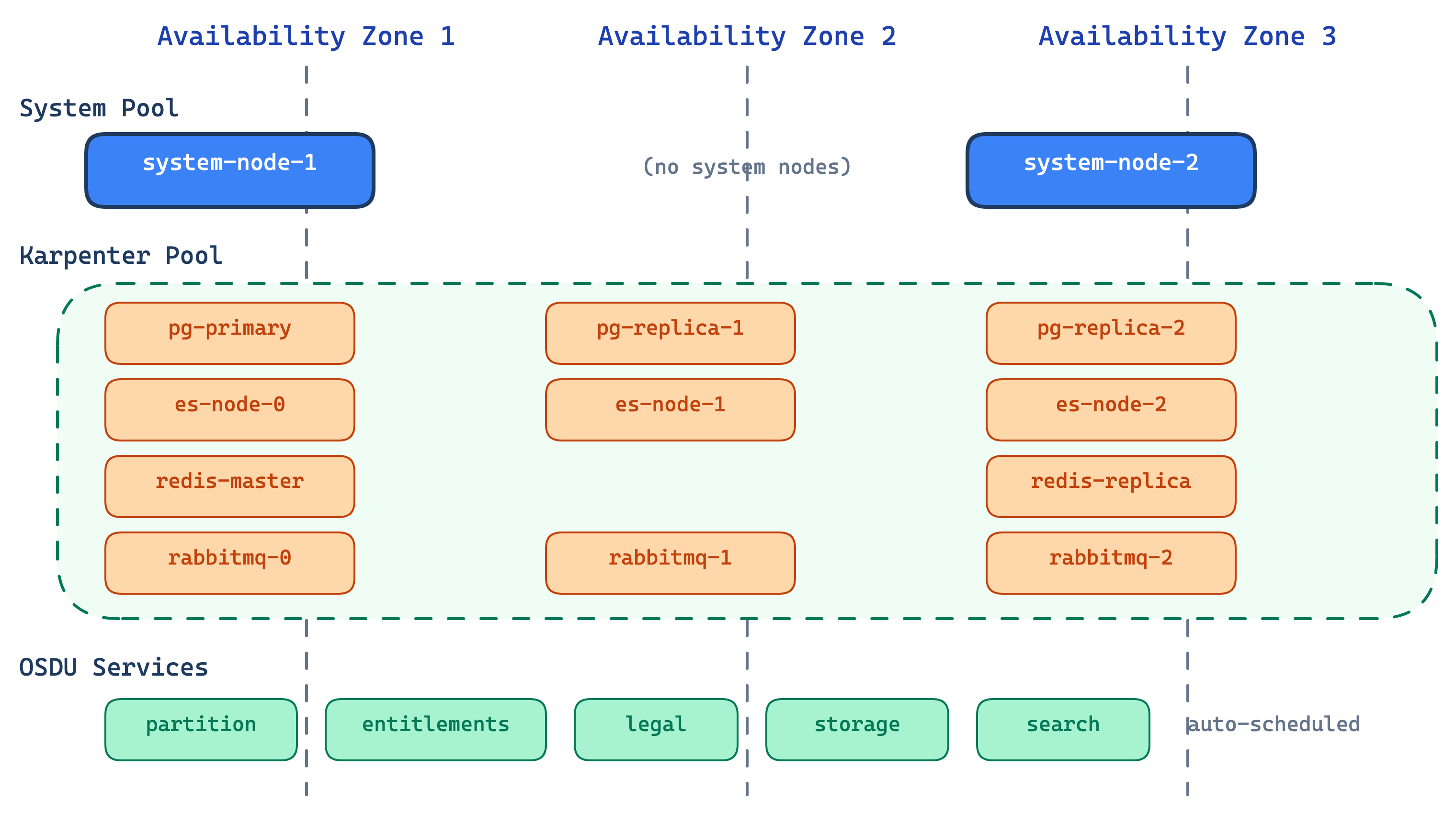
The cluster spreads workloads across Azure availability zones for high availability:
- System pool pins to configurable zones (default: zones 1 and 3)
- Platform pool (Karpenter) dynamically selects from available zones
- Stateful middleware distributes replicas across AZs for resilience
- OSDU services remain schedulable across surviving zones during an AZ loss
Node Pools
System components are pinned to reserved nodes, while platform and OSDU workloads run on auto-provisioned capacity that scales with demand.
Reserved nodes for critical cluster components.
| Property | Value |
|---|---|
| VM Size | Standard_D4lds_v5 (configurable) |
| Count | 2 |
| Taints | CriticalAddonsOnly |
| Managed By | AKS (VMSS) |
| Zones | Configurable (default: 1, 2, 3) |
Middleware and OSDU services on auto-provisioned nodes.
| Property | Value |
|---|---|
| VM Size | D-series (4-8 vCPU), auto-selected |
| Count | Auto-scaled |
| Taints | workload=platform:NoSchedule |
| Managed By | NAP (Karpenter) |
| Zones | Dynamically selected |
General workloads like MinIO and Airflow task pods.
| Property | Value |
|---|---|
| VM Size | Auto-provisioned |
| Count | Auto-scaled |
| Taints | None |
| Managed By | NAP (Karpenter) |
Why Karpenter (NAP) for platform workloads?
Traditional node pools can fail when a specific VM size isn't available in a zone. Karpenter avoids this by selecting from multiple VM sizes per zone automatically, scaling nodes on demand and consolidating when idle (see ADR-0006).
Network Architecture
Network Plugin:      Azure CNI Overlay
Network Dataplane:   Cilium
Outbound Type:       Managed NAT Gateway
Service CIDR:        10.0.0.0/16
DNS Service IP:      10.0.0.10
- Azure CNI Overlay: Pod IPs in overlay network, no VNet subnet exhaustion
- Cilium: eBPF-based network policy enforcement
- Managed NAT Gateway: Outbound traffic via dedicated NAT
- Istio mTLS: STRICT mode for east-west traffic (see Security)
Resource Naming and Tagging
Consistent naming and tags support ownership tracking, cost allocation, and multi-environment operations.
All resources follow the pattern: <prefix>-<project>-<environment>
| Resource | Pattern | Example |
|---|---|---|
| Resource Group | rg-cimpl-{env} | rg-cimpl-dev |
| AKS Cluster | cimpl-{env} | cimpl-dev |
| Namespaces | platform, osdu | platform-blue, osdu-blue |
All Azure resources include:
| Tag | Value |
|---|---|
| azd-env-name | Environment name |
| project | cimpl |
| Contact | Owner email address |
See also
- Deployment Model — how infrastructure fits into the layered architecture
- Platform Services — middleware deployed on top of this infrastructure
- Security — Azure RBAC, workload identity, and network security details